IPv6+Ruby part 5: Service discovery with IPv6 and Multicast
Table of Contents
This post is the last in a series about IPv6 and why it matters. If you are interested in the details, please read the first four articles. If you just want to know about how Ruby handles multicast in IPv6, this is the place for you.
In this post, we will dive into multicast in Ruby with IPv6 and make a simple service discovery program to run in our network without a central server.
Multicast UDP
Up until now, we have been working with a 1-to-1 relation called Unicast, but we will now tackle a 1-to-many relationship called Multicast. It should also be clear from this why we cannot use TCP, as TCP requires setting up a session between a client and a server. A simplified comparison looks like this:
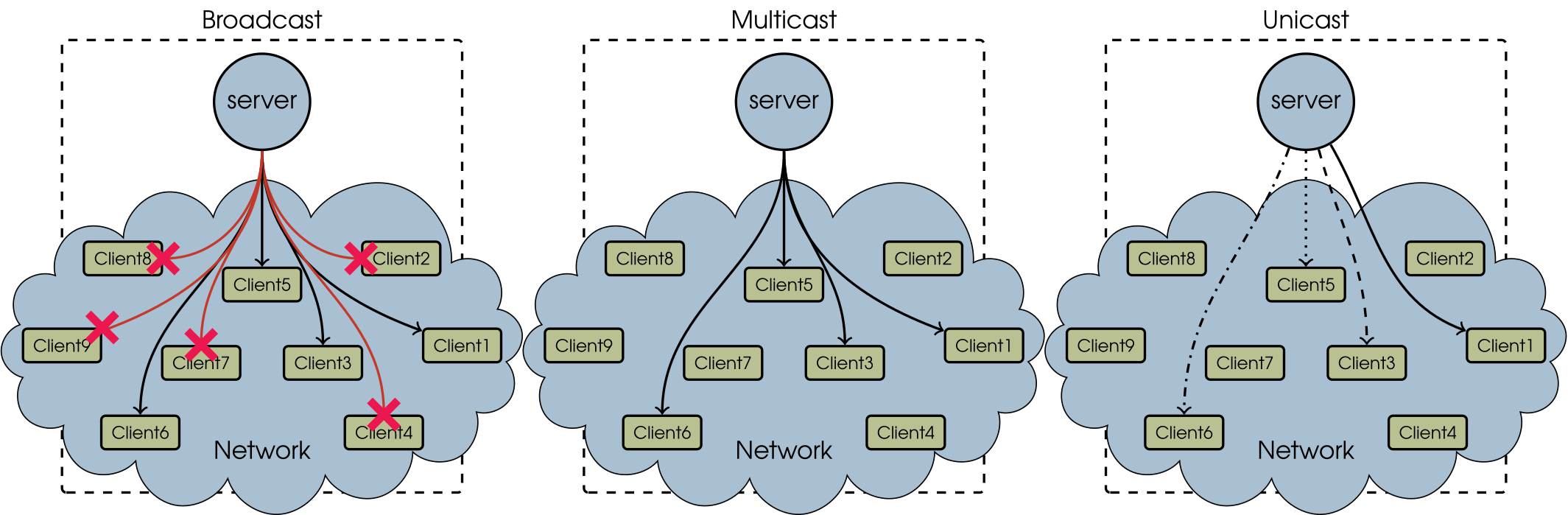
Only 4 of the 9 clients are interested in the message. In broadcast, everyone get the message no matter what, but 5 of the clients throw them away. In multicast only those who subscribe to the message gets the message. Unicast makes a new connection for each receiver and sends out multiple copies of the same message.
When talking about multicast, there are two main topics: routed and switched. Routed multicast is there for messages that need to go down through a network, crossing routers, and is used for things like PTPv2, true video streaming, and a lot of other things. It is however more a study in routers, so I will skip that for now and focus on the switched multicast, the one that is just in the network segment.
In the case of our echo client-server system, we can do something smart with multicast. Instead of having a single server echoing back our message, we can remove the server and have all clients echo back, essentially making a kind of “service discovery” protocol where each machine advertises its link-local address when asked for.
This mimics a lot of zeroconf software that uses multicast. Apple’s Bonjour as an example uses multicast DNS to discover other Bonjour devices in the network by having all the devices announce their own presence via multicast.
Creating the multicast service
Just as before, the main focus is here is on IPv6, so let us firstly choose an
IPv6 multicast address. There are some rules on how these should be selected,
but the main things are that the address should be within the ff00::/16
segment, and that the fourth nibble (character) determines the scope of the
multicast packet RFC7371. We want a scope of “link-local” which is
2, and we can then choose an address of ff02::beeb (chosen because it sounds
fun). We will use 12345 as the UDP port.
Setting up the socket is a bit more complicated this time around and we need to
know the ID of the interface we are using. To do this, we can use
Socket#getifaddrs that can also tell us the name of the interface and the
link-local address of the interface. In addition, I have added the possibility
of selecting the interface used by name in case the interface you need is not
the first one.
def get_interface_info(name)
  ifaddrs = Socket.getifaddrs.reject do |ifaddr|
    !ifaddr.addr&.ipv6_linklocal? || (ifaddr.flags & Socket::IFF_MULTICAST == 0)
  end
  ifaddrs.select! {|ifaddr| ifaddr.name == name } if name
  ifaddrs.map {|ifaddr| [ifaddr.name, ifaddr.ifindex, ifaddr.addr.ip_address] }
end
A lot of stuff is happening here. First of all, we only want IP interfaces with
IPv6 link-local addresses. The sneaky & saves us from an additional check for
if this is IP or not. We also only want interfaces that support multicast (
IFF_MULTICAST). Then we see if we got an interface name, filter on that, and
then return an array of the collected information as:
[["if_name", index, "ip_address"],[...]]
Secondly, we need to create the socket. This time around, we need to use
#setsocketopt on our socket to get multicast working.
def create_socket(multicast_addr, multicast_port, ifindex)
  # Create, bind, and return a UDP multicast socket
  UDPSocket.new(Socket::AF_INET6).tap do | s |
    ip = IPAddr.new(multicast_addr).hton + [ifindex].pack('I')
    s.setsockopt(Socket::IPPROTO_IPV6, Socket::IPV6_JOIN_GROUP, ip)
    s.setsockopt(Socket::IPPROTO_IPV6, Socket::IPV6_MULTICAST_HOPS, [1].pack('I'))
    s.setsockopt(Socket::IPPROTO_IPV6, Socket::IPV6_MULTICAST_IF, [ifindex].pack('I'))
    s.bind("::", multicast_port)
  end
end
To listen on multicast, we need to IPV6_JOIN_GROUP. This socket option takes
a struct with the big-endian 128-bit representation of the multicast address,
as well as an unsigned int with the interface index. We can get this by using
#hton on the ip address, pack('I') the interface index, and then just
concatenate the fields as a string to mimic the struct ipv6_mreq used by
#setsockopt.
For sending, we need to specify how many hops we want our multicast packet to
go. This is the same as saying, “how many routers do we want this packet to
traverse” +1. We just want it in the network, and give it 1 as an unsigned
int. We also need to specify what interface we will use for sending, and again
pack this as an unsigned int.
Lastly, bind the socket to everything (::) on our selected port and return
it.
Now that we have a socket, we can firstly send a request out on the network asking for other devices. This is done in basically the same way as when we did UDP:
def send_request(socket, linklocal_addr, multicast_addr, multicast_port,
                 flags)
  puts "========= Sending echo REQUEST from #{linklocal_addr}"
  socket.send("[REQUEST] Hello from #{linklocal_addr}",
              flags, multicast_addr, multicast_port)
end
The listener is not a big change from UDP either. The main parts here are:
- We do not care about messages from ourselves
- We only respond if the message begins with
[REQUEST]
The second part is a poor-mans protocol, and usually you would define a proper protocol, maybe using something like protobufs, but this will do for now:
def echo_listener(socket, linklocal_addr, multicast_addr, multicast_port,
                  flags, msg_length)
  loop do
    # Listen for messages of up to specified length
    message, client = socket.recvfrom(msg_length)

    # Extract client information given as array and log connection
    addr_info = Addrinfo.new(client)

    # We are not interested in messages from our selves
    next if addr_info.ip_address == linklocal_addr

    # Write out the received message
    puts message

    # Only reply if a request is send. We will make infinite packet loops
    # in our network if we don't do this
    if(message.split.first == "[REQUEST]")
      puts "========= Sending echo REPLY to #{addr_info.ip_address}"
      socket.send("[REPLY]   Hello from #{addr_info.ip_address}",
                  flags, multicast_addr, multicast_port)
    end
  end
end
Lastly we put it together, make our definitions, and run it all:
require 'socket'
require 'ipaddr'

def get_interface_info(name)
  ifaddrs = Socket.getifaddrs.reject do |ifaddr|
    !ifaddr.addr&.ipv6_linklocal? || (ifaddr.flags & Socket::IFF_MULTICAST == 0)
  end
  ifaddrs.select! {|ifaddr| ifaddr.name == name } if name
  ifaddrs.map {|ifaddr| [ifaddr.name, ifaddr.ifindex, ifaddr.addr.ip_address] }
end

# Set-up and prepare socket
def create_socket(multicast_addr, multicast_port, ifindex)
  UDPSocket.new(Socket::AF_INET6).tap do | s |
    ip = IPAddr.new(multicast_addr).hton + [ifindex].pack('I')
    s.setsockopt(Socket::IPPROTO_IPV6, Socket::IPV6_JOIN_GROUP, ip)
    s.setsockopt(Socket::IPPROTO_IPV6, Socket::IPV6_MULTICAST_HOPS, [1].pack('I'))
    s.setsockopt(Socket::IPPROTO_IPV6, Socket::IPV6_MULTICAST_IF, [ifindex].pack('I'))
    s.bind("::", multicast_port)
  end
end

# Sender thead
def send_request(socket, linklocal_addr, multicast_addr, multicast_port,
                 flags)
  Thread.new do
    # Ensure that we are listening before talking
    sleep 0.1
    puts "========= Sending echo REQUEST from #{linklocal_addr}"
    socket.send("[REQUEST] Hello from #{linklocal_addr}",
                flags, multicast_addr, multicast_port)
  end
end

def echo_listener(socket, linklocal_addr, multicast_addr, multicast_port,
                  flags, msg_length)
  loop do
    # Listen for messages of up to specified length
    message, client = socket.recvfrom(msg_length)

    # Extract client information given as array and log connection
    addr_info = Addrinfo.new(client)

    # We are not interested in messages from our selves
    next if addr_info.ip_address == linklocal_addr

    # Write out the received message
    puts message

    # Only reply if a request is send. If not, we will make infinite packet
    # loops in our network
    if(message.split.first == "[REQUEST]")
      puts "========= Sending echo REPLY to #{addr_info.ip_address}"
      socket.send("[REPLY]   Hello from #{addr_info.ip_address}",
                  flags, multicast_addr, multicast_port)
    end
  end
end

if __FILE__==$0
  MULTICAST_ADDR = "ff02::beeb"
  MULTICAST_PORT = 12345
  MSG_LENGTH     = 256
  FLAGS          = 0

  # Call with interface name if you want to use another interface than the
  # first one presented from getifaddrs
  interface_name, ifindex, linklocal_addr = get_interface_info(ARGV[0]).first
  puts "Using local interface #{interface_name} with address #{linklocal_addr}"

  socket = create_socket(MULTICAST_ADDR, MULTICAST_PORT, ifindex)
  send_request(socket, linklocal_addr, MULTICAST_ADDR, MULTICAST_PORT, FLAGS)
  echo_listener(socket, linklocal_addr, MULTICAST_ADDR, MULTICAST_PORT, FLAGS,
                MSG_LENGTH)
end
If you want to test out this code, you need at least two hosts. If you do not have a second computer, you can make a quick VM or something like that.
Firstly, I run the code to start the service on my main machine:
cmol@qui-gon:~$ ruby src/multicast.rb
Using local interface wlp4s0 with address fe80::71c0:aa40:6d16:7c59%wlp4s0
========= Sending echo REQUEST from fe80::71c0:aa40:6d16:7c59%wlp4s0
There is no reply as no other host is running the service. Then I start the service on the second host and get a single reply:
cmol@second-host:~$ ruby src/multicast.rb
Using local interface enp0s31f6 with address fe80::ade4:80af:c170:6340%enp0s31f6
[REPLY]   Hello from fe80::71c0:aa40:6d16:7c59%wlp4s0
This reply comes from my main machine that is already running the service.
Running the service on the third host gives two replies:
cmol@third-host:~$ ruby src/multicast.rb
Using local interface enp0s3 with address fe80::a00:27ff:fe07:dea6%enp0s3
========= Sending echo REQUEST from fe80::a00:27ff:fe07:dea6%enp0s3
[REPLY]   Hello from fe80::71c0:aa40:6d16:7c59%wlp4s0
[REPLY]   Hello from fe80::ade4:80af:c170:6340%enp0s31f6
The first reply from my main machine, and the second reply from the second machine.
Finally, going back to my main machine I can see all requests and replies:
cmol@qui-gon:~$ ruby src/multicast.rb
Using local interface wlp4s0 with address fe80::71c0:aa40:6d16:7c59%wlp4s0
========= Sending echo REQUEST from fe80::71c0:aa40:6d16:7c59%wlp4s0
[REQUEST] Hello from fe80::ade4:80af:c170:6340%enp0s31f6
========= Sending echo REPLY to fe80::ade4:80af:c170:6340%wlp4s0
[REQUEST] Hello from fe80::a00:27ff:fe07:dea6%enp0s3
========= Sending echo REPLY to fe80::a00:27ff:fe07:dea6%wlp4s0
[REPLY]   Hello from fe80::ade4:80af:c170:6340%enp0s31f6
Two main things to note here are:
- Seeing the reply from the second host to the third host on the last line.
- The
%sign after the address specifies the interface. In the request messages, the interface of the requester will be in the message. In the reply to those requests, the local interface of the replying machine will be used instead.
This now means that we have a working multicast service that would let us do a very simple service discovery in the network.
Wrapping up
This has been the last part in a series of blog posts about how IPv6 works with implementations in Ruby. If you have not read the other parts, I highly recommend you to go back and give them a read!
- IPv6+Ruby part 1: Introduction to IPv6
- IPv6+Ruby part 2: IPv6 and web applications
- IPv6+Ruby part 3: Dual stack (IPv4+IPv6) TCP sockets
- IPv6+Ruby part 4: Dual stack (IPv4+IPv6) TCP sockets
- IPv6+Ruby part 5: Service discovery with IPv6 and Multicast
References
- https://ruby-doc.org/stdlib-2.5.3/libdoc/socket/rdoc/Addrinfo.html
- https://ruby-doc.org/stdlib-2.5.3/libdoc/socket/rdoc/Socket.html
- https://ruby-doc.org/stdlib-2.5.3/libdoc/ipaddr/rdoc/IPAddr.html
- https://ruby-doc.org/stdlib-2.5.3/libdoc/socket/rdoc/UDPSocket.html
- https://www.freebsd.org/cgi/man.cgi?query=ip6&sektion=4&manpath=FreeBSD+9.1-RELEASE
- https://linux.die.net/man/3/getifaddrs
- https://en.wikipedia.org/wiki/Multicast_address#IPv6
- https://tools.ietf.org/html/rfc7371